Employee e-files made easy. Filing cabinets, retired.
Contracts, diplomas, certificates and benefits of every employee in one place. Say goodbye to the paper trail and try Unrubble's Document Management.
Start unrubbling for freeTrusted by teams at







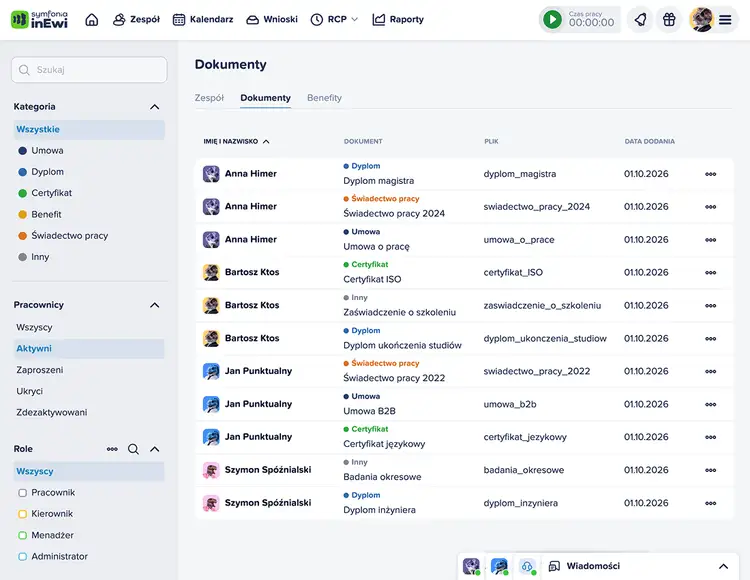
Filing cabinets won't solve your employee documents problem.
A contract in a folder, a diploma in an email, a certificate on HR's desktop - sound familiar? Unrubble gathers employee documents and benefits in one place, and every entry keeps the file it came from.
Start unrubbling for freeAll in one place
The whole company in one table, or one employee in their own file.
Access control
You choose each person's access: the whole company, their own team, or none.
No duplicates
Upload the same file twice and Unrubble will not save a second copy.
299950+
happy users!
Building an employee file that keeps contracts, diplomas, certificates and benefits in one place, and watches over who gets to see them.
Start unrubbling for free
Great value for the money. Relatively easy to learn and monitor your employees Clock Ins and Clock Outs.

Donnie H.
Capterra
It's easy to use for managers and user. Killer-feature = work scheduling drafts, I can make a draft and publish it when everything is ready.
Rezaul K.
Capterra
The application has a user friendly interface and it can be used by anybody with little or no experience with it.

Michelle M.
G2.com
With Unrubble, your employees can record their work time from any location, using any device and powerful mobile app that includes GPS tracking.

William "Bill" Murphy
intuitiveaccountant.com
Really easy to use with great interaction, it's made a huge difference to the efficiency of our office. Customer service is also really good and very helpful.

Amy T.
GetApp
Very intuitive, with the tutorial guiding you through each step in the application set-up, customizable pricing (you pay for what you need), innovative QR code clock-in, clock-out solution, haven't seen this in any other cloud time track tool.
Mateusz P.
Capterra
I like how easy it is to manage from admin point of view, as well as from user pov.
Filimore S.
G2.com
After identifying the need for such software, we had positive tests after less than a month, thanks to that we immediately implemented the system into the company.
Emon A.
Capterra
Great value for the money. Relatively easy to learn and monitor your employees Clock Ins and Clock Outs.
Donnie H.
Capterra
It's easy to use for managers and user. Killer-feature = work scheduling drafts, I can make a draft and publish it when everything is ready.
Rezaul K.
Capterra
The application has a user friendly interface and it can be used by anybody with little or no experience with it.
Michelle M.
G2.com
With Unrubble, your employees can record their work time from any location, using any device and powerful mobile app that includes GPS tracking.
William "Bill" Murphy
intuitiveaccountant.com
Really easy to use with great interaction, it's made a huge difference to the efficiency of our office. Customer service is also really good and very helpful.
Amy T.
GetApp
Very intuitive, with the tutorial guiding you through each step in the application set-up, customizable pricing (you pay for what you need), innovative QR code clock-in, clock-out solution, haven't seen this in any other cloud time track tool.
Mateusz P.
Capterra
I like how easy it is to manage from admin point of view, as well as from user pov.
Filimore S.
G2.com
After identifying the need for such software, we had positive tests after less than a month, thanks to that we immediately implemented the system into the company.
Emon A.
Capterra
Great value for the money. Relatively easy to learn and monitor your employees Clock Ins and Clock Outs.
Donnie H.
Capterra
It's easy to use for managers and user. Killer-feature = work scheduling drafts, I can make a draft and publish it when everything is ready.
Rezaul K.
Capterra
The application has a user friendly interface and it can be used by anybody with little or no experience with it.
Michelle M.
G2.com
With Unrubble, your employees can record their work time from any location, using any device and powerful mobile app that includes GPS tracking.
William "Bill" Murphy
intuitiveaccountant.com
Really easy to use with great interaction, it's made a huge difference to the efficiency of our office. Customer service is also really good and very helpful.
Amy T.
GetApp
Very intuitive, with the tutorial guiding you through each step in the application set-up, customizable pricing (you pay for what you need), innovative QR code clock-in, clock-out solution, haven't seen this in any other cloud time track tool.
Mateusz P.
Capterra
I like how easy it is to manage from admin point of view, as well as from user pov.
Filimore S.
G2.com
After identifying the need for such software, we had positive tests after less than a month, thanks to that we immediately implemented the system into the company.
Emon A.
Capterra
One tool, full control over employee documents.
Keep employee documents in Unrubble, with every entry linked to its source file. No more "where did we put that scan?"
Two views, one employee file.
Browse documents your way. The company-wide view shows one table with every employee, a category filter and search. Open a single employee and see only their documents, along with a spot to drop in new files.
Upload in three steps.
Drag in your files (PDF, JPG, JPEG, PNG, up to 15 MB each) and let the wizard guide you.1. Upload - every file gets its own status.2. Review - pick a category and fill in the form. One scan can become several entries.3. Summary & send - entries land in the employee file one by one, so a failed file never blocks the rest.
No duplicates in the file.
Upload the same file twice (same name and same content) and Unrubble spots the duplicate instead of saving another copy. You'll see the existing entry in read-only mode, tagged "Already in the file".
Six document categories, each with its own form.
Contract - contract type, job title, work location.Diploma - degree, school, field of study, graduation date.Certificate - issuer, issue and expiration dates.Benefit - one of the benefits defined in your company account, with the monthly value for employer and employee.Termination & offboarding - previous employer, job title, employment period.Other - name, description, note.
Benefits and permissions under control.
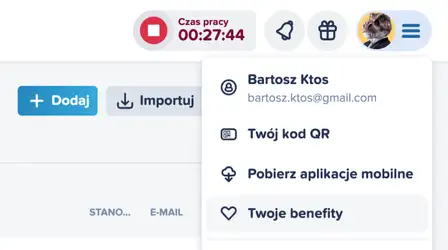
Define benefits once, for the whole company.
Set up the available benefits right in your account: name, type, provider and description. Then assign them to employees. Editing a benefit later won't touch the entries you already assigned.
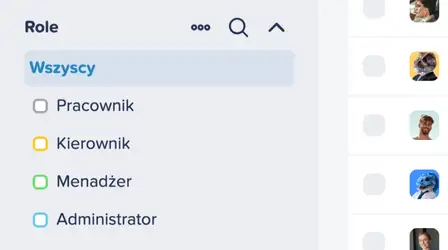
Access matched to the role.
The administrator gives each person one of three access levels: the whole organization sees and edits everyone's documents, the team level covers only people who share a team tag, and no access means an employee can't even see their own documents.
Send the filing cabinet into retirement.
- File always attached. A contract, diploma or certificate never drifts away from the file it was entered from.
- Categories, like folders in a cabinet. Contract, diploma, certificate, benefit, termination & offboarding or other, each with its own form.
- Access you control. You choose each person's access: the whole company, their own team, or none.
Unrubble your employee documents.
Forget digging through folders and shared drives. Create a free account and add your first employee documents to Unrubble today.
Start unrubbling for freeOld-fashioned way
Finding a contract in a folder: up to 2h!
Emailing a certificate: 15 min
Checking who has access to a file: 30 min
Updating a benefit in a spreadsheet: 20 min
Handing over files to a new HR manager: up to 3h!
up to 7h
The Unrubble way
Finding a contract in a folder: automatic
Emailing a certificate: automatic
Checking who has access to a file: automatic
Updating a benefit in a spreadsheet: automatic
Handing over files to a new HR manager: automatic
ZERO min in total
Cut the time spent on employee paperwork up to 6x!
Stupid-easy to setup...
...and use from minute one, so you can concentrate on what really matters in your job.
Try for free
No credit card required. No hidden fees or unexpected charges. Simple as that.
Get startedEmployee e-files are just the beginning.
Pair Document Management with time tracking, scheduling and PTO tracking, and keep everything about your team in one app.
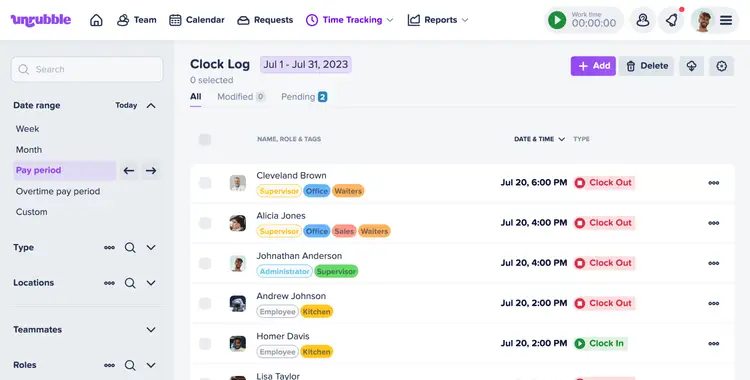
Time tracking re-imagined.
We're as user-friendly as a puppy, but we pack a productivity punch. Assisting your employees to optimize their work hours, we foster a culture of productivity and success. Harness time, don't just track it.
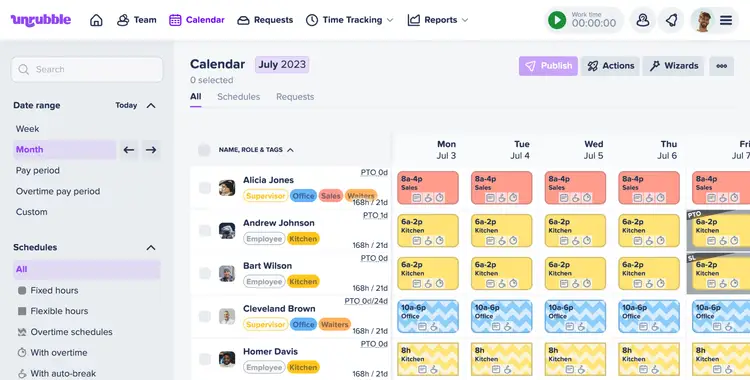
Unleash your scheduling power with Unrubble's Work Scheduling.
Unrubble is your organization's scheduling wizard, offering features like automatic schedule generation, comprehensive shift notes, and instant modification notifications. The manual scheduling era is over! Say hello to a more streamlined, efficient process.
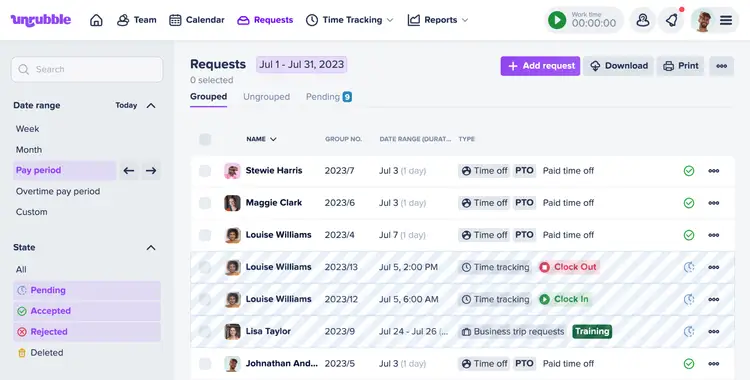
Streamline your leave management with Unrubble's PTO Tracker.
One-stop solution for managing PTOs, WFHs, and vacations. With Unrubble, you can effortlessly monitor and manage time-off requests, ensuring a smooth and efficient leave process. It's like having a personal assistant for your organization's leave management!
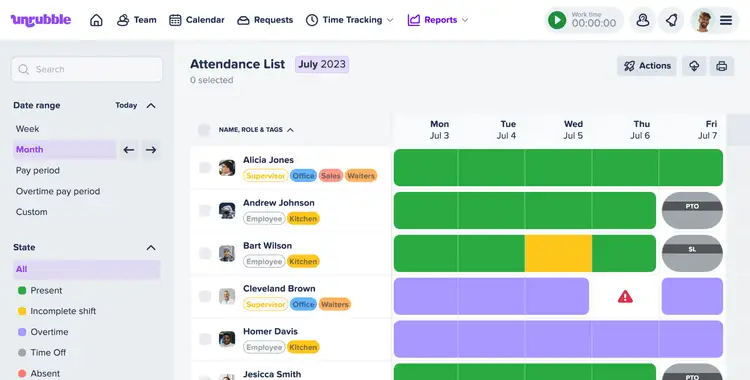
Optimize your time tracking with Unrubble's Timesheets.
Our tool offers comprehensive reporting tools, mobile apps for on-the-go insights, and seamless integration with payroll systems. It's not just about tracking time, it's about optimizing it for your organization's success.
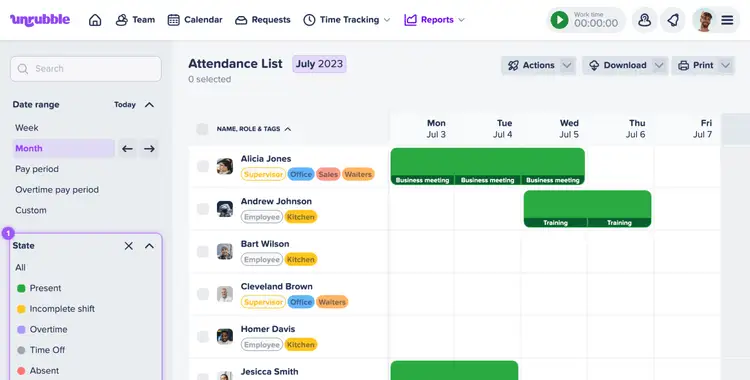
Simplify your business trips with Unrubble.
Unrubble makes managing business trips effortless with features like transparent planning, dedicated communication channels, and the ability to store travel documents in the cloud without the need to print. Enjoy compliant, efficient management for all your travel needs.
No more buddy punching with Unrubble's Time Clock App.
With Unrubble, you can easily manage time theft. Our tool offers QR code identification, photo ID integration, and GPS time clock features. It's not just about tracking time, it's about optimizing it for your organization's success.
Supercharge your time off management with Unrubble's ESS App.
Our advanced software helps you seamlessly track employee hours, manage time off requests, and ensure transparency. With Unrubble, you can keep your records current, view employee attendance details, and ensure accurate reports every single time.
Got questions?
We've got answers.
- It keeps the contracts, diplomas, certificates, termination paperwork and benefit information of every employee in one place, as digital files instead of paper ones.
- PDF, JPG, JPEG and PNG files, up to 15 MB each, several at once. One scan can become multiple entries, for example a diploma and a certificate coming from the same file.
- The administrator decides. Each person gets either access to the whole organization, access to their own team only, or no access at all. An employee with no access cannot see the file, not even their own documents.
- Unrubble recognizes a duplicate when the file has the same name and content, and does not save a second copy. The same scan uploaded under a different name is saved as a new file.
- Yes. You define a benefit once in your company account and then assign it to as many employees as you like, each with their own monthly value.
Focus on the fun parts of work!
Let Unrubble handle all your boring stuff.
Automate work schedule planning, work time tracking, pto management, and much more.
Start unrubbling for free